Cloud Computing – AWS, Azure & Google Cloud
Get unlimited access to all learning content and premium assets Membership Pro
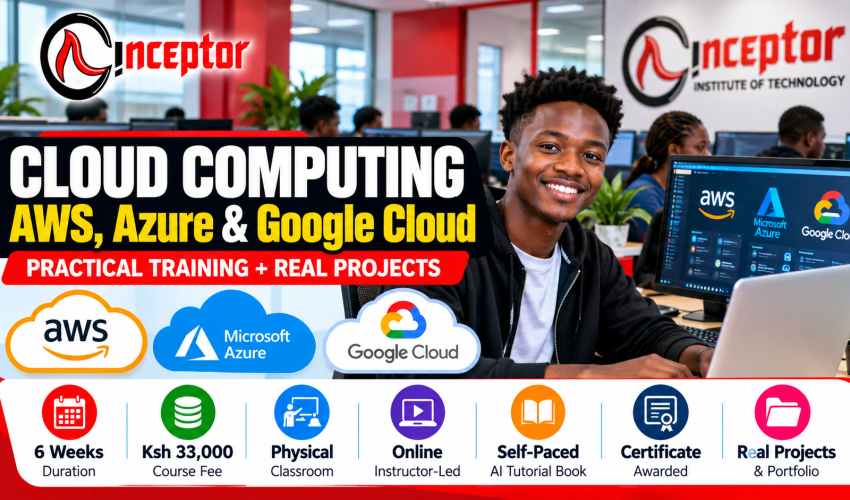
Cloud Computing Course in Kenya – AWS, Azure & Google Cloud
Learn Practical Multi-Cloud Skills Through Hands-On Training & Real-World Projects
Learn how modern cloud infrastructure works and develop practical skills across Amazon Web Services (AWS), Microsoft Azure and Google Cloud with Inceptor Institute of Technology.
The Cloud Computing – AWS, Azure & Google Cloud Course is a 6-week practical multi-cloud training program designed for beginners, IT students, graduates, professionals, developers, system administrators, entrepreneurs and career changers who want to understand and work with modern cloud infrastructure.
Instead of concentrating only on cloud theory, the course follows a practical learning model:
Learn → Configure → Deploy → Secure → Monitor → Troubleshoot → Build Projects → Document Your Skills
Course at a Glance
| Course Detail | Information |
| Course | Cloud Computing – AWS, Azure & Google Cloud |
| Duration | 6 Weeks |
| Course Fee | Ksh 33,000 |
| Cloud Platforms | AWS + Microsoft Azure + Google Cloud |
| Level | Beginner to Intermediate |
| Training | Physical Classroom / Instructor-Led Online / Self-Paced AI Tutorial-Enabled Course Book |
| Training Model | Comprehensive Hands-On Training + Real-World Projects |
| Assessment | Practical Exercises + Projects |
| Certificate | Inceptor Certificate upon successful completion |
| Portfolio | Practical project evidence for professional profiling |
What Is Cloud Computing?
Cloud computing is the delivery of computing resources such as servers, storage, databases, networking, applications, security tools and processing power over the internet instead of an organization having to own and operate all of the physical infrastructure itself.
For example, a business that needs a server for its website does not necessarily have to purchase a physical server, install it in an office and maintain it internally.
Using a cloud platform such as AWS, Microsoft Azure or Google Cloud, the organization can provision computing resources when required and scale those resources as its requirements change.
This course introduces important cloud concepts including:
- Infrastructure as a Service (IaaS)
- Platform as a Service (PaaS)
- Software as a Service (SaaS)
- Public cloud
- Private cloud
- Hybrid cloud
- Multi-cloud environments
- Virtual machines
- Cloud storage
- Virtual networking
- Cloud databases
- Identity and Access Management (IAM)
- Scalability
- High availability
- Shared responsibility
- Cloud security
- Monitoring
- Automation
- Cloud economics and pay-as-you-go models
The objective is not simply to memorize terminology.
You should understand how cloud infrastructure is actually designed, deployed, secured, monitored and managed.
Why Learn AWS, Azure and Google Cloud Together?
Cloud computing is bigger than one provider.
Amazon Web Services, Microsoft Azure and Google Cloud each provide extensive cloud ecosystems. Although individual service names differ, many of the underlying concepts are transferable.
For example:
| Cloud Function | AWS | Microsoft Azure | Google Cloud |
| Virtual Servers | EC2 | Azure Virtual Machines | Compute Engine |
| Object Storage | S3 | Blob Storage | Cloud Storage |
| Networking | VPC | Virtual Network | VPC |
| Identity | IAM | Microsoft Entra ID / Azure IAM concepts | Cloud IAM |
| Managed SQL | RDS | Azure SQL | Cloud SQL |
| Serverless | Lambda | Azure Functions | Cloud Run / Cloud Functions |
| Monitoring | CloudWatch | Azure Monitor | Cloud Monitoring |
Learning these concepts across multiple providers helps you understand the cloud architecture itself, rather than learning only where to click inside one platform.
That foundation can be useful when progressing toward cloud engineering, cloud administration, DevOps, cybersecurity, infrastructure, software development and other technology roles.
What Will You Learn?
The course takes you through cloud fundamentals before progressing into hands-on work with AWS, Microsoft Azure and Google Cloud.
You will learn how to:
- Understand cloud architecture and service models
- Work with virtual machines
- Configure cloud storage
- Understand virtual networks
- Apply identity and access controls
- Deploy applications and websites
- Work with cloud databases
- Understand serverless computing
- Apply basic cloud security controls
- Configure monitoring
- Understand load balancing and scalability
- Control cloud costs
- Understand backup and disaster recovery
- Compare AWS, Azure and Google Cloud services
- Understand Infrastructure as Code
- Get introduced to Terraform
- Understand Docker and container concepts
- Understand Kubernetes fundamentals
- Apply AI responsibly to cloud administration and troubleshooting
- Document cloud projects professionally
- Build evidence of practical cloud skills
6-Week Cloud Computing Course Curriculum
Week 1: Cloud Computing Foundations
The first week establishes the foundation needed before working extensively with individual cloud providers.
You Will Learn
- What cloud computing is
- Traditional infrastructure vs cloud infrastructure
- IaaS, PaaS and SaaS
- Public, private and hybrid cloud
- Multi-cloud environments
- Regions and availability zones
- Virtualization
- Virtual machines
- Storage concepts
- Cloud networking fundamentals
- Databases
- Identity and Access Management
- Shared responsibility
- Cloud security fundamentals
- Scalability
- Availability
- Cloud pricing concepts
- Cost control
- Cloud architecture fundamentals
Practical Exercise
Set up appropriate learning environments and deploy your first basic cloud resources.
The objective is to move immediately from:
“I understand cloud computing”
to:
“I have started working with cloud infrastructure.”
Week 2: Amazon Web Services (AWS)
During Week 2, learners work with Amazon Web Services (AWS) and learn how important AWS services fit together.
AWS Topics
- AWS global infrastructure
- Regions and Availability Zones
- Identity and Access Management (IAM)
- Amazon EC2
- Amazon S3
- Amazon VPC
- Security Groups
- Amazon RDS
- Elastic Load Balancing concepts
- Auto Scaling concepts
- Route 53 concepts
- AWS Lambda
- Serverless computing
- Amazon CloudWatch
- AWS security fundamentals
- AWS pricing
- Billing and cost management
Practical AWS Project
Deploy a Secure Website/Application Architecture on AWS
The project may involve:
Network → Compute → Storage/Database → Security → Monitoring
You will document what you deployed, why individual services were selected, how access is controlled and how the environment could be monitored.
The AWS component also introduces knowledge relevant to foundational AWS certification study. Inceptor certification and AWS certification are separate credentials.
Week 3: Microsoft Azure
Week 3 moves into the Microsoft cloud ecosystem.
Azure Topics
- Microsoft Azure architecture
- Regions and availability
- Azure subscriptions and resources
- Resource Groups
- Azure Virtual Machines
- Virtual Network
- Storage Accounts
- Blob Storage
- Identity and access
- Microsoft Entra ID concepts
- Azure SQL
- Load-balancing concepts
- Azure Functions
- Serverless concepts
- Azure Monitor
- Security
- Governance
- Cost management
- Infrastructure as Code introduction
Practical Azure Project
Deploy and Monitor a Cloud Application/Infrastructure Environment on Microsoft Azure
Learners work through the process of provisioning resources, configuring appropriate access, connecting services and monitoring the environment.
The module also develops foundational understanding relevant to areas covered by Microsoft Certified: Azure Fundamentals (AZ-900).
Inceptor’s certificate does not replace the external Microsoft certification examination.
Week 4: Google Cloud
During Week 4, learners work with Google Cloud.
Google Cloud Topics
- Google Cloud architecture
- Projects
- Regions and zones
- Compute Engine
- Cloud Storage
- VPC networking
- Identity and Access Management
- Cloud SQL
- Cloud Run
- Cloud Functions concepts
- Serverless computing
- Load balancing concepts
- Cloud Monitoring
- Cloud security
- Billing
- Budgets and cost controls
Practical Google Cloud Project
Build and Deploy a Scalable Application Environment on Google Cloud
Learners will understand how Google Cloud approaches compute, networking, storage, IAM, databases, application deployment and monitoring.
The module can also provide useful foundations for learners who later choose to study toward Google Cloud certification pathways such as Cloud Digital Leader or Associate Cloud Engineer.
External certification examinations are separate from Inceptor course certification.
Week 5: Multi-Cloud, DevOps, Security & Automation
Once you understand individual cloud environments, the course brings the concepts together.
Multi-Cloud & DevOps Topics
- What is multi-cloud?
- Multi-cloud architecture
- Cloud migration fundamentals
- Backup strategies
- Disaster recovery
- High availability
- Fault tolerance concepts
- Identity and Access Management
- Least privilege
- Encryption concepts
- Cloud security best practices
- Logging
- Monitoring
- Cost optimization
- Docker fundamentals
- Containers
- Kubernetes overview
- CI/CD concepts
- Infrastructure as Code
- Terraform introduction
- Cloud automation
- AI-assisted cloud administration
- AI-assisted troubleshooting
- Responsible use of AI in infrastructure work
Multi-Cloud Practical Exercise
Take a common workload and examine how it could be implemented across:
AWS → Azure → Google Cloud
Compare:
Compute + Storage + Networking + IAM + Database + Monitoring + Cost + Operational Considerations
This develops one of the most valuable multi-cloud skills: the ability to understand the underlying requirement instead of depending exclusively on one vendor’s terminology.
Week 6: Capstone Project, Portfolio & Career Preparation
The final week focuses on demonstrating what you can do.
Learners complete or document a practical cloud project.
Possible Capstone Projects
- Deploy a secure cloud-hosted website
- Deploy a virtual server
- Design a multi-tier cloud architecture
- Configure networking, storage and databases
- Build a serverless application
- Configure cloud monitoring and alerts
- Design a backup and disaster-recovery solution
- Develop a multi-cloud architecture proposal
- Perform a basic cloud cost analysis
- Create a cloud migration plan
- Compare equivalent AWS, Azure and Google Cloud architectures
Project Documentation
Students learn to document their work using a professional structure:
Problem → Requirements → Architecture → Implementation → Security → Testing → Results → Lessons Learned
Where appropriate, project evidence may include:
- Architecture diagrams
- Deployment documentation
- Screenshots
- GitHub repositories
- Infrastructure-as-Code files
- Configuration documentation
- Cost estimates
- Security decisions
- Troubleshooting reports
- Project case studies
The objective is to finish with more than:
“I completed a cloud course.”
You should be working toward being able to say:
“Here is cloud infrastructure I configured, deployed and documented.”
Cloud Certification Pathways
Cloud certifications can provide an additional way to validate vendor-specific knowledge.
After building the appropriate knowledge and practical experience, learners may consider pathways such as:
Amazon Web Services
- AWS Certified Cloud Practitioner
- AWS role-based certification pathways as skills and experience develop
Microsoft Azure
- Microsoft Certified: Azure Fundamentals (AZ-900)
- Azure Administrator and other role-based pathways as learners progress
Google Cloud
- Cloud Digital Leader
- Associate Cloud Engineer
- Professional-level Google Cloud certification pathways after developing sufficient experience
Important Certification Note
The Ksh 33,000 course fee covers the Inceptor training program as described.
An Inceptor course certificate and an AWS, Microsoft or Google Cloud certification are not the same credential.
Unless explicitly stated otherwise by Inceptor, third-party certification examinations and associated examination fees are separate.
Certification structures can also change, so learners preparing for vendor examinations should always check the latest official AWS, Microsoft and Google Cloud requirements.
Who Should Take This Cloud Computing Course?
This course is suitable for:
- Beginners interested in cloud computing
- University and college students
- IT students and graduates
- System administrators
- Network technicians
- IT support professionals
- Software developers
- Cybersecurity learners
- DevOps learners
- Data professionals
- Entrepreneurs
- Freelancers
- Career changers
- Professionals interested in cloud technology
- People interested in remote/global technology opportunities
Do I Need Programming Experience?
You do not need to be an experienced programmer to begin learning cloud computing fundamentals.
Basic computer literacy and a willingness to learn technical concepts provide a starting point.
Knowledge of networking, Linux, command-line tools or programming can make some technical areas easier and becomes increasingly useful as you progress into cloud engineering, DevOps and automation.
What Can You Do After Learning Cloud Computing?
Cloud computing can contribute to several technology career pathways.
Depending on your previous education, experience, practical skills, certifications and specialization, possible pathways include:
- Cloud Support Associate
- Junior Cloud Engineer
- Cloud Administrator
- Cloud Support Specialist
- Cloud Operations
- Systems Administration
- Infrastructure Engineering
- Technical Support Engineering
- Junior DevOps
- Cloud Security
- Solutions Architecture
- Cloud Migration
- Cloud Consulting
Completing a six-week course does not automatically qualify someone for every role listed above.
Advanced positions such as Cloud Architect, DevOps Engineer, Cloud Security Engineer and senior cloud engineering roles normally require deeper technical knowledge, practical experience and, in some cases, additional certifications.
Think of the course as a practical foundation from which you can continue building.
Cloud Computing for Freelancing & Business
Cloud skills can also be applied outside conventional employment.
As your practical competence develops, possible services can include:
- Cloud infrastructure setup
- Website and application deployment
- Server configuration
- Cloud storage setup
- Backup configuration
- Cloud migration assistance
- Monitoring configuration
- Cloud documentation
- Basic cloud cost reviews
- Infrastructure support
- Technical consulting
Professional responsibility is important.
Only provide services that match your actual competence, particularly when dealing with production systems, sensitive information, cybersecurity, business-critical applications and infrastructure.
Turn Your Cloud Computing Knowledge Into Digital Products
Cloud knowledge can potentially become a digital asset as well as a professional skill.
Once you have developed genuine expertise and practical experience, you can package specific knowledge into useful digital products.
Examples include:
- AWS beginner guides
- Azure tutorials
- Google Cloud tutorials
- Cloud deployment checklists
- Cloud migration checklists
- Cloud security checklists
- Architecture templates
- Terraform templates
- Cloud cost calculators
- Troubleshooting guides
- Cloud interview preparation guides
- Original certification study resources
- Cloud lab manuals
- Video tutorials
- Technical ebooks
- Cloud prompt libraries
- Mini-courses
- Cloud architecture worksheets
The process can be:
LEARN → PRACTICE → BUILD → DOCUMENT → PACKAGE KNOWLEDGE → PUBLISH → SELL
A learner who becomes skilled at deploying websites to the cloud, for example, could eventually create an original practical guide explaining the deployment process.
A learner who develops cloud-cost-management expertise could create a cloud cost calculator or optimization checklist.
A learner who becomes proficient with Terraform could create original infrastructure templates and implementation guides.
Digital knowledge marketplaces such as Vezill can provide a channel for packaging and selling legitimate knowledge products such as guides, tutorials, templates, spreadsheets, prompts, checklists and other practical resources.
Creators must respect AWS, Microsoft, Google and other third-party trademarks, copyright and intellectual-property requirements. Proprietary course content and certification examination material should not be redistributed.
Three Ways to Study
1. Physical Classroom Training
Attend instructor-led training physically and work through cloud concepts, demonstrations, labs and projects in a structured classroom environment.
This option is suitable for learners who prefer direct interaction with an instructor.
2. Instructor-Led Online Training
Learn remotely with instructor guidance.
This is suitable for students outside Nairobi or learners who need the flexibility of participating without attending the physical classroom regularly.
3. Self-Paced AI Tutorial-Enabled Course Book
Study independently through a structured course book designed to guide you through the curriculum step by step, with AI-enabled tutorial support for explanations and learning assistance.
AI should be used as a learning assistant, not as a substitute for understanding what you are configuring.
Cloud professionals must be able to verify configurations, understand security implications and troubleshoot systems instead of blindly following AI-generated instructions.
Why Study Cloud Computing at Inceptor?
Multi-Cloud Learning
Develop knowledge across AWS + Microsoft Azure + Google Cloud instead of being introduced to only one cloud ecosystem.
Hands-On Training
Cloud computing is a practical discipline. The training emphasizes configuration, deployment, troubleshooting and projects.
Real-World Projects
Use projects to connect individual cloud concepts into complete solutions.
Project Profiling
Document practical work so that you can demonstrate your developing skills rather than depending exclusively on a certificate.
Flexible Training
Choose between:
Physical Classroom + Instructor-Led Online + Self-Paced AI Tutorial-Enabled Learning
Career + Entrepreneurship Perspective
Explore how cloud skills can support employment, freelancing, consulting, entrepreneurship and knowledge-product creation.
Frequently Asked Questions
How much is the Inceptor Cloud Computing Course?
The Cloud Computing – AWS, Azure & Google Cloud Course costs Ksh 33,000 and runs for six weeks.
How long does the course take?
The course runs for 6 weeks and combines cloud fundamentals, AWS, Azure, Google Cloud, multi-cloud concepts, security, automation and practical projects.
Does the course teach AWS?
Yes. Learners are introduced to practical AWS services and concepts including EC2, S3, VPC, IAM, RDS, Lambda, CloudWatch and related cloud architecture concepts.
Does the course teach Microsoft Azure?
Yes. Azure training covers services and concepts including Virtual Machines, Virtual Network, Blob Storage, Azure SQL, identity, Azure Functions, Azure Monitor, security and governance.
Does the course teach Google Cloud?
Yes. Learners work with Google Cloud concepts and services including Compute Engine, Cloud Storage, VPC, IAM, Cloud SQL, Cloud Run and Cloud Monitoring.
Can I learn AWS, Azure and Google Cloud together?
Yes. Many fundamental cloud concepts transfer between providers. Learning multiple platforms helps you understand the underlying architecture while recognizing how each provider implements comparable services.
Can a beginner learn cloud computing?
Yes. Beginners can start with cloud fundamentals before progressing into individual AWS, Azure and Google Cloud services.
Do I need coding experience?
Programming is not required to understand basic cloud concepts, but scripting and programming become increasingly useful as you progress into automation, DevOps and advanced cloud engineering.
Is the course practical?
Yes. The training model emphasizes hands-on learning and real-world projects, rather than relying exclusively on theoretical instruction.
What projects can I build?
Projects can include cloud-hosted websites, secure virtual servers, multi-tier architectures, serverless applications, monitoring environments, backup solutions, migration plans and multi-cloud architecture comparisons.
Do I receive a certificate?
Learners who successfully complete the program receive an Inceptor course certificate.
Does the course prepare me for AWS certification?
The AWS component can provide foundational knowledge relevant to further AWS study, including foundational certification preparation. External AWS certification is separate from the Inceptor certificate.
Does the course help with AZ-900 preparation?
The Azure component covers foundational cloud and Azure concepts that overlap with areas relevant to Microsoft Azure Fundamentals (AZ-900). Learners should use Microsoft’s current official exam guide when preparing specifically for the examination.
What about Google Cloud certification?
The Google Cloud component can provide foundational knowledge useful for further study toward pathways such as Cloud Digital Leader and, with additional hands-on development, Associate Cloud Engineer.
Are AWS, Microsoft and Google certification exam fees included?
Do not assume external certification examination fees are included in the Ksh 33,000 course fee unless Inceptor explicitly states that they are included for a particular intake.
Can I study online?
Yes. The program provides an Instructor-Led Online Training option in addition to physical classroom training.
Is there a self-paced option?
Yes. Learners can choose a Self-Paced AI Tutorial-Enabled Course Book for structured independent study.
Can cloud computing skills be used for freelancing?
Yes. With sufficient competence and experience, cloud skills can support services such as deployment, server configuration, cloud migration assistance, storage setup, monitoring, documentation and technical support.
Can I sell digital products based on cloud knowledge?
Yes. Genuine cloud expertise can be packaged into original guides, templates, tutorials, checklists, calculators, lab manuals and other knowledge products, provided intellectual-property and trademark requirements are respected.
Start Building Your Cloud Computing Skills
Cloud computing is not simply about knowing the names of AWS, Azure or Google Cloud services.
The valuable skill is understanding how to take a requirement and determine:
What infrastructure is required? → How should it be deployed? → How should it be secured? → How will it scale? → How will it be monitored? → How much will it cost?
The Inceptor Cloud Computing – AWS, Azure & Google Cloud Course is designed to help you start developing these practical capabilities.
Course Summary
AWS + Microsoft Azure + Google Cloud
Duration: 6 Weeks
Course Fee: Ksh 33,000
Physical Classroom + Instructor-Led Online + Self-Paced AI Tutorial-Enabled Course Book
Comprehensive Hands-On Training
Practical Real-World Projects
Inceptor Certificate
Project Evidence & Professional Profiling
Enroll for Cloud Computing Training at Inceptor Institute of Technology
Develop practical multi-cloud skills.
Build real projects.
Document what you can do.
Prepare for the next stage of your cloud computing journey.
Learn → Build → Deploy → Secure → Demonstrate Your Skills

Get unlimited access to all learning content and premium assets Membership Pro