
Power BI & Business Intelligence Course in Kenya
Get unlimited access to all learning content and premium assets Membership Pro
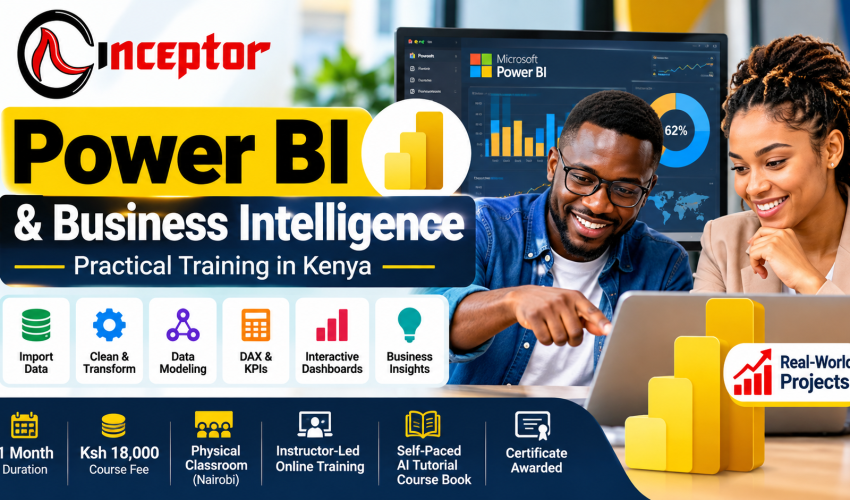
Power BI & Business Intelligence Course in Kenya – 1 Month Practical Training
Learn Power BI. Build Professional Dashboards. Turn Data Into Business Decisions.
Learn how to transform raw business data into clear dashboards, reports, KPIs and actionable insights with the Power BI & Business Intelligence Course at Inceptor Institute of Technology.
This intensive 1-month Power BI course in Kenya is designed for beginners, professionals, entrepreneurs, graduates and aspiring data analysts who want practical Business Intelligence skills they can apply in employment, business, freelancing or consulting.
Instead of learning Power BI through theory alone, you will work with realistic datasets, clean and transform data, build data models, create DAX measures, develop interactive dashboards and complete practical Business Intelligence projects that can become evidence of your skills.
Course: Power BI & Business Intelligence
Duration: 1 Month
Course Fee: Ksh 18,000
Location: Nairobi, Kenya
Skill Level: Beginner-Friendly
Certification: Certificate upon successful completion
Learning Model: Hands-On Training + Practical Real-World Projects
Training Options
Choose the learning method that works for you:
- Physical Classroom Training in Nairobi
- Live Instructor-Led Online Training
- Self-Paced AI Tutorial-Enabled Course Book
What Is Power BI?
Microsoft Power BI is a Business Intelligence and data visualization platform used to connect, transform, analyse and visualize data so that organizations can make better-informed decisions.
Instead of spending hours manually interpreting rows of data in spreadsheets, Power BI can help you transform information into interactive reports, visualizations and dashboards.
For example, a business could use Power BI to answer questions such as:
- Which products generate the most revenue?
- Which branches are performing best?
- Are sales increasing or declining?
- How is actual spending comparing with budget?
- Which marketing channels generate the most leads?
- What is the employee turnover trend?
- Which KPIs require management attention?
Power BI helps turn:
RAW DATA → CLEAN DATA → MODEL DATA → ANALYSE → VISUALIZE → DASHBOARD → BUSINESS INSIGHT → DECISION
What Is Business Intelligence?
Business Intelligence (BI) is the process of collecting, organizing, analysing and presenting business data to support better decision-making.
A company may already have thousands or millions of data records from sales, finance, HR, inventory, customers, marketing or operations.
The challenge is turning that data into useful answers.
Business Intelligence helps decision-makers understand:
What happened? → Why did it happen? → What trends are emerging? → Where should attention be focused?
Power BI is one of the tools that can be used to build these Business Intelligence solutions.
Why Learn Power BI & Business Intelligence?
Organizations generate increasing amounts of data, but raw data alone has limited value.
People who can transform that data into understandable business information can contribute to reporting, planning and decision-making.
Learning Power BI can help you develop practical skills in:
- Data cleaning
- Data transformation
- Data modeling
- Business reporting
- Data visualization
- DAX calculations
- KPI development
- Dashboard creation
- Business analysis
- Data storytelling
- Management reporting
- AI-assisted analytics
The course can therefore be valuable even if your job title is not “Data Analyst.”
An accountant might use Power BI for financial dashboards. A marketer might analyse campaign performance. HR professionals can develop workforce reports. Sales managers can monitor targets and revenue. Business owners can use dashboards to understand operations.
Who Should Take This Power BI Course?
The course is suitable for learners who want to develop practical Business Intelligence and reporting skills.
It may be particularly useful for:
- Complete beginners
- University and college students
- Graduates and job seekers
- Career changers
- Aspiring Data Analysts
- Aspiring Business Intelligence Analysts
- Excel users
- Accountants and finance professionals
- Business owners and entrepreneurs
- Sales professionals
- Digital marketers
- HR professionals
- Operations professionals
- Project managers
- Researchers
- Monitoring & Evaluation professionals
- NGO and development-sector professionals
- Freelancers and consultants
- Managers and supervisors
- Professionals responsible for business reporting
You do not have to be a programmer to start learning Power BI.
What Will You Learn?
By the end of the training, learners should have been introduced to the workflow required to take business data from its raw form to a structured Business Intelligence report.
You will learn how to:
- Import data into Power BI
- Connect to common data sources
- Clean messy datasets using Power Query
- Transform data into useful formats
- Create relationships between tables
- Understand fact and dimension tables
- Build basic data models
- Create DAX measures
- Calculate business KPIs
- Create charts and visualizations
- Build interactive reports
- Develop professional dashboards
- Apply filters and slicers
- Use drill-down and drill-through
- Design executive reports
- Publish Power BI reports
- Understand Power BI Service
- Apply basic report security concepts
- Use AI assistance responsibly in analytics
- Interpret dashboards and communicate business insights
Most importantly, you will apply the concepts through practical exercises and projects.
1-Month Power BI & Business Intelligence Course Curriculum
Week 1: Power BI & Business Intelligence Foundations
The first week establishes the foundation for understanding Power BI and Business Intelligence.
Module 1: Introduction to Business Intelligence
Learn:
- What Business Intelligence means
- Why organizations use BI
- Data-driven decision-making
- Difference between raw data and business information
- Business reporting and analytics
- Understanding KPIs
- Common Business Intelligence use cases
Module 2: Introduction to Microsoft Power BI
Explore:
- Power BI ecosystem
- Power BI Desktop
- Power BI Service overview
- Reports and dashboards
- Datasets and data sources
- Understanding the Power BI interface
Module 3: Getting Data Into Power BI
Learn how to:
- Import Excel files
- Import CSV data
- Connect to common data sources
- Understand tables and fields
- Review data types
- Prepare datasets for analysis
Practical Exercise
Import a business dataset and develop your first Power BI report.
Week 2: Power Query, Data Cleaning & Data Modeling
Good dashboards depend on good data.
Week 2 concentrates on preparing, transforming and structuring data before visualization.
Module 4: Data Cleaning With Power Query
Learn how to use Power Query to prepare data for analysis.
Topics include:
- Power Query Editor
- Removing duplicates
- Handling missing values
- Correcting data types
- Renaming columns
- Splitting columns
- Merging columns
- Filtering data
- Append queries
- Merge queries
- Transforming datasets
- Basic data-quality principles
What Is Power Query?
Power Query is the data connection and transformation technology used to retrieve, clean, reshape and prepare data before analysis.
Instead of repeatedly cleaning the same report manually, Power Query can help create repeatable transformation steps.
Module 5: Data Modeling
Learn how multiple tables work together.
Topics include:
- Understanding relationships
- One-to-many relationships
- Fact tables
- Dimension tables
- Star-schema concepts
- Creating date/calendar tables
- Building useful data models
- Preparing models for analysis
What Is a Data Model?
A data model defines how different data tables and fields relate to one another so that they can be analysed together correctly.
Week 3: DAX, KPIs, Visualization & Dashboard Development
Week 3 moves from preparing data to analysing and communicating it.
Module 6: Introduction to DAX
DAX — Data Analysis Expressions — is a formula language used in Power BI to create calculations and analytical measures.
Learn concepts including:
- Measures vs calculated columns
- SUM
- AVERAGE
- COUNT
- DISTINCTCOUNT
- IF
- DIVIDE
- CALCULATE
- Basic time-intelligence concepts
The objective is not simply to memorize formulas but to understand how calculations answer business questions.
Module 7: Business Metrics & KPIs
Learn how to turn data into useful measurements.
Depending on the dataset, examples could include:
- Total Revenue
- Total Expenses
- Profit
- Profit Margin
- Sales Growth
- Average Order Value
- Customer Count
- Conversion Rate
- Budget vs Actual
- Employee Headcount
- Marketing ROI
What Is a KPI?
A Key Performance Indicator (KPI) is a measurable value used to evaluate performance against a defined objective.
Module 8: Data Visualization
Learn how to present information visually.
Topics include:
- Charts
- Tables
- Cards
- Slicers
- Filters
- Conditional formatting
- Drill-down
- Drill-through
- Tooltips
- Choosing appropriate visualizations
- Dashboard layout
- Data storytelling
What Is Data Visualization?
Data visualization is the graphical presentation of data through charts, dashboards and other visual elements to make patterns, trends and comparisons easier to understand.
Module 9: Building Professional Power BI Dashboards
Learn how individual visualizations become a useful Business Intelligence solution.
Explore:
- Dashboard planning
- Visual hierarchy
- Executive reporting
- KPI placement
- User-friendly navigation
- Interactive analysis
- Business storytelling
- Designing dashboards around decision-making
The objective is to move beyond creating attractive charts and develop reports that answer meaningful business questions.
Week 4: Advanced Reporting, Power BI Service, AI & Capstone Project
Module 10: Advanced Interactive Reporting
Learn concepts including:
- Interactive reports
- Bookmarks
- Navigation
- Dashboard usability
- Mobile-friendly reporting
- Report performance considerations
Module 11: Power BI Service
Explore how Power BI reports move beyond the desktop environment.
Topics include:
- Introduction to Power BI Service
- Publishing reports
- Workspaces
- Sharing concepts
- Data refresh concepts
- Basic security concepts
- Introduction to Row-Level Security
Power BI in the Age of AI
Artificial Intelligence is changing how analysts interact with data and Business Intelligence tools.
Rather than treating AI as a replacement for analytical skills, this course introduces learners to ways AI can complement their Power BI workflow.
Potential AI-assisted applications include:
- Exploring datasets
- Explaining DAX formulas
- Assisting with DAX development
- Suggesting possible visualizations
- Identifying patterns worth investigating
- Summarizing dashboard findings
- Generating business narratives
- Accelerating report development
- Asking natural-language questions about data
- Supporting analytical reasoning
You will also learn why AI-generated analysis must be verified.
AI assistance + Data skills + Business understanding + Human verification = More effective analysis
Some AI and Copilot functionality may depend on the Microsoft product, license, tenant configuration and feature availability.
Hands-On Power BI Projects
This course emphasizes practical application.
Learners should not finish the program knowing only what buttons to click. Projects help demonstrate whether you can apply the concepts to realistic business problems.
Project 1: Sales Performance Dashboard
Build a dashboard analysing areas such as:
- Revenue
- Sales trends
- Products
- Salespeople
- Regions
- Monthly performance
- Profit or margins where applicable
Business Question
Where is revenue coming from, what is changing, and where should management focus attention?
Project 2: Financial Performance Dashboard
Build a financial dashboard analysing:
- Revenue
- Expenses
- Profit
- Budget vs actual
- Monthly performance
- Key financial indicators
This project can be particularly relevant to finance, accounting and management-reporting applications.
Project 3: HR Analytics Dashboard
Create an HR-focused dashboard using metrics such as:
- Employee headcount
- Departments
- Workforce demographics
- Attendance where data is available
- Turnover where appropriate
- Workforce trends
Project 4: Marketing Performance Dashboard
Analyse marketing data such as:
- Leads
- Campaign performance
- Conversion
- Customer acquisition
- Marketing channels
- ROI where sufficient data exists
Final Capstone Project: Build a Business Intelligence Solution
The final project brings the course together.
Starting with a realistic raw dataset, apply the complete BI workflow:
IMPORT → CLEAN → TRANSFORM → MODEL → ANALYSE → VISUALIZE → BUILD DASHBOARD → PRESENT INSIGHTS
The finished project can become part of your professional project portfolio.
Don’t Just Earn a Certificate — Build Evidence of What You Can Do
There is an important difference between telling a prospective employer or client:
“I know Power BI.”
and being able to say:
“Here are the Power BI dashboards and Business Intelligence projects I have built.”
Inceptor’s project-based training is designed to help learners develop evidence of applied learning.
Your projects may support your:
- CV
- LinkedIn profile
- Professional portfolio
- Job applications
- Interviews
- Freelance profiles
- Client proposals
- Career development
Think of your learning outcome as:
SKILLS + PROJECTS + PORTFOLIO EVIDENCE + CERTIFICATE
Career Opportunities After Learning Power BI & Business Intelligence
Power BI skills can complement several career paths.
Depending on your broader education, experience, technical depth and portfolio, relevant roles may include:
- Power BI Developer
- Business Intelligence Analyst
- Data Analyst
- Reporting Analyst
- MIS/Reporting Officer
- Business Analyst
- Dashboard Developer
- Business Intelligence Consultant
- Sales Analyst
- Marketing Analyst
- Financial Analyst
- Operations Analyst
- HR/People Analytics roles
- Monitoring & Evaluation reporting roles
- Freelance Power BI Developer
- Power BI Trainer
Completing a one-month course does not automatically qualify someone for every role listed. Employers may require additional education, industry knowledge, SQL, Excel, statistics, Python, cloud technologies or professional experience.
The projects you build can, however, help demonstrate practical ability.
Power BI for Accountants & Finance Professionals
Power BI can complement accounting and financial reporting skills.
Potential applications include:
- Profit and loss dashboards
- Revenue analysis
- Expense analysis
- Cash-flow reporting
- Budget vs actual analysis
- Branch performance
- Financial KPIs
- Management reporting
- Trend analysis
Instead of distributing static spreadsheets alone, finance professionals can use interactive reports to help stakeholders explore financial performance.
Power BI for Sales & Marketing Professionals
Sales teams can use Power BI to analyse:
- Revenue
- Sales targets
- Products
- Salespeople
- Branches
- Territories
- Customer segments
- Monthly trends
Marketing professionals may use BI dashboards for:
- Campaign reporting
- Lead analysis
- Conversion tracking
- Channel performance
- Customer acquisition
- Marketing ROI
Power BI for HR Professionals
Power BI can help HR teams transform workforce information into visual reports covering areas such as:
- Headcount
- Department distribution
- Employee demographics
- Recruitment
- Attendance
- Turnover
- Workforce trends
Power BI for Entrepreneurs & Business Owners
You don’t need to become a full-time data analyst to benefit from Business Intelligence.
Business owners can use dashboards to understand:
- Sales
- Expenses
- Products
- Customers
- Inventory
- Branch performance
- Marketing
- Staff
- Business KPIs
Better visibility into business performance can support more informed decisions.
Freelancing & Consulting Opportunities With Power BI
After developing sufficient proficiency and a strong portfolio, Power BI skills can potentially be packaged into professional services.
Examples include:
- SME dashboard development
- Sales dashboard creation
- Financial dashboards
- Inventory dashboards
- HR dashboards
- Marketing dashboards
- Data-cleaning services
- Excel-to-Power-BI migration
- Monthly reporting solutions
- Management reporting
- KPI dashboards
- Dashboard customization
- Business Intelligence consulting
- Power BI staff training
A freelancer could, for example, approach a business that currently prepares repetitive Excel reports and offer to develop a more structured Power BI reporting solution.
Income is not guaranteed; commercial results depend on skill, market demand, positioning, client acquisition, pricing and execution.
Turn Your Power BI Knowledge Into Digital Products
Power BI knowledge can potentially create opportunities beyond employment and client services.
Once you have developed genuine competence, you can package useful knowledge and resources into digital products.
Examples include:
- Power BI beginner guides
- Dashboard templates
- KPI dashboard templates
- DAX cheat sheets
- Power Query guides
- Business reporting templates
- Sales dashboard templates
- Financial dashboard templates
- HR analytics templates
- Practice datasets
- Power BI exercises
- Video tutorials
- Mini-courses
- Business Intelligence checklists
- AI prompt packs for data analysis
- Industry-specific BI guides
The model is simple:
LEARN → PRACTICE → BUILD → PACKAGE → SELL
These resources can potentially be distributed through digital-product marketplaces such as Vezill and other suitable platforms.
For example, instead of only building a sales dashboard for one client, an experienced creator might package a reusable dashboard template with instructions and sell it as a digital product.
This creates another potential pathway for converting technical knowledge into useful products, without implying guaranteed sales or income.
Three Ways to Learn
1. Physical Classroom Power BI Training in Nairobi
Attend practical instructor-supported training at Inceptor Institute of Technology in Nairobi.
This option is suitable for learners who prefer direct classroom interaction and guided practical sessions.
2. Instructor-Led Online Power BI Training
Join live remote training with an instructor.
This option allows learners who cannot physically attend classes in Nairobi to participate remotely.
3. Self-Paced AI Tutorial-Enabled Course Book
Learn through structured course material at your own pace, supported by AI-assisted tutorials and explanations where applicable.
This option can suit learners who require greater flexibility and prefer independent study.
The learning experience may vary between the three delivery methods.
Power BI & Business Intelligence Certificate
Learners who successfully complete the required Inceptor training and assessment receive an Inceptor Power BI & Business Intelligence Certificate.
The focus is:
CERTIFICATE + PRACTICAL SKILLS + PROJECTS + PORTFOLIO EVIDENCE
The Inceptor certificate should not be confused with a Microsoft professional certification.
Microsoft’s Power BI Data Analyst certification pathway, including the PL-300 examination, is a separate Microsoft credential and follows Microsoft’s own certification requirements.
Course Details at a Glance
| Course Information | Details |
| Course | Power BI & Business Intelligence |
| Duration | 1 Month |
| Course Fee | Ksh 18,000 |
| Location | Nairobi, Kenya |
| Physical Training | Available |
| Instructor-Led Online | Available |
| Self-Paced Learning | AI Tutorial-Enabled Course Book |
| Skill Level | Beginner-Friendly |
| Training Model | Hands-On + Project-Based |
| Projects | Practical Power BI/BI Projects |
| Certificate | Awarded upon successful completion |
| Core Skills | Power BI, Power Query, Data Modeling, DAX, Dashboards, BI & AI-Assisted Analytics |
Power BI Course vs Broader Data Analytics Training
Power BI is a focused Business Intelligence and visualization platform.
Learners who want to develop a broader data analytics skill set may eventually combine Power BI with:
- Advanced Excel
- SQL
- Statistics
- Python
- Database technologies
- AI-assisted analytics
Students interested in progressing into a broader analytics pathway can explore Inceptor’s Data Analytics Course in Kenya.
Inceptor also offers related Data Analysis training and AI training for learners interested in expanding their technical capabilities.
Frequently Asked Questions
1. What is Power BI?
Power BI is Microsoft’s Business Intelligence and data visualization platform. It helps users connect, transform, analyse and visualize data through reports and dashboards.
2. What is Business Intelligence?
Business Intelligence is the process of transforming organizational data into reports, dashboards and insights that support decision-making.
3. Is Power BI difficult for beginners?
Beginners can start learning Power BI without prior programming experience. Data modeling and advanced DAX become more technical as learners progress, which is why structured practice is important.
4. Can I learn Power BI in one month?
One month can provide a focused foundation and practical experience in Power BI when accompanied by consistent practice. Developing advanced proficiency normally requires continued application beyond the course.
5. How much is the Power BI course in Kenya at Inceptor?
The 1-month Power BI & Business Intelligence course costs Ksh 18,000.
6. Where can I learn Power BI in Nairobi?
Inceptor Institute of Technology offers physical Power BI & Business Intelligence training in Nairobi, as well as instructor-led online and self-paced options.
7. Can I study Power BI online?
Yes. Inceptor offers instructor-led online training as one of the available delivery methods.
8. Do I need programming skills to learn Power BI?
No programming experience is required to begin. Learners will, however, be introduced to DAX for creating analytical calculations.
9. What is Power Query?
Power Query is a data connection and transformation technology used to import, clean, reshape and prepare data for analysis.
10. What is DAX?
DAX stands for Data Analysis Expressions. It is a formula language used in Power BI to create calculations, measures and analytical logic.
11. What is a Power BI dashboard?
A dashboard or interactive report presents important metrics and visualizations so users can understand business performance and explore data more efficiently.
12. Will I build real Power BI projects?
Yes. The course is designed around practical projects covering areas such as sales, finance, HR and marketing, together with a final Business Intelligence capstone project.
13. Do I receive a certificate?
A certificate is awarded upon successful completion of the required Inceptor training and assessment.
14. Is the Inceptor certificate a Microsoft certification?
No. The Inceptor course certificate and Microsoft’s professional certification programs are separate credentials.
15. Is Power BI useful for accountants?
Yes. Accountants and finance professionals can use Power BI for financial reporting, budget analysis, revenue and expense analysis, KPI dashboards and management reporting.
16. Is Power BI useful for business owners?
Yes. Business owners can use BI dashboards to monitor sales, customers, expenses, inventory, marketing and other business KPIs.
17. Can Power BI skills be used for freelancing?
Potentially. Experienced practitioners may provide dashboard development, reporting, data-cleaning and Business Intelligence services to clients.
18. Can I sell Power BI digital products?
Once you have developed sufficient expertise, you may create useful digital resources such as dashboard templates, guides, DAX references, practice datasets and BI training materials and distribute them through platforms such as Vezill or other appropriate marketplaces.
19. What is the difference between Excel and Power BI?
Excel is widely used for spreadsheets, calculations and analysis. Power BI focuses heavily on data modeling, interactive visualization, dashboards and Business Intelligence reporting. The tools can also complement each other.
20. What should I learn after Power BI?
Depending on your career goals, you may progress into advanced Power BI, Excel, SQL, statistics, Python, database technologies, cloud data platforms or broader Data Analytics and AI skills.
Why Learn at Inceptor Institute of Technology?
Inceptor’s training approach emphasizes applied learning.
The objective is not simply to know terminology.
It is to progress through:
LEARN → PRACTICE → BUILD → DEMONSTRATE
By combining structured learning with practical projects, learners can develop both knowledge and evidence of application.
Start Your Power BI & Business Intelligence Journey
If you want to learn how to transform raw data into meaningful dashboards, reports, KPIs and business insights, the Power BI & Business Intelligence Course at Inceptor Institute of Technology provides a focused one-month learning pathway.
Duration: 1 Month
Course Fee: Ksh 18,000
Training: Physical Classroom | Instructor-Led Online | Self-Paced AI Tutorial-Enabled Course Book
Location: Nairobi, Kenya
Inceptor Institute of Technology
Hazina Towers, 18th Floor, Utalii Lane, Nairobi, Kenya
Call/WhatsApp: +254 728 456 781
Email: admin@inceptor.co.ke
Enrol for the Next Intake
Learn Power BI. Build Dashboards. Turn Data Into Decisions.

Get unlimited access to all learning content and premium assets Membership Pro